Privacy Statements – Information for websites owners.

How does the new Website Privacy Statement affect my website?

As of the 1st of December 2020, the new Privacy 2020 Act came into effect in New Zealand. So what does that mean for your website, and how should you respond to the changes?

Why has the Privacy Act changed?

The Act has been amended to make it more relevant to today’s landscape, where so much business and communication is conducted online.

Key changes that relate to websites include:

  • Organisations should ensure they have robust systems in place for digital forms
  • Organisations must give people the right to access their personal information
  • Organisations should minimise the amount of information they collect from a person wherever possible (i.e. if the name and email is sufficient then don’t ask for more unnecessary information)
  • If information is being sent overseas (i.e. a cloud-based service) then the organisation must ensure that the overseas company handles the data in accordance with the New Zealand Privacy Act 2020
  • If an organisation has a breach, then they need to notify affected people directly and the Privacy Commissioner as soon as possible.

If you have an existing Privacy Statement on your website, now is a good time to review it.

Do I need to have a Privacy Statement on my website?

If you’re collecting any information from a visitor on your website (for example, someone filling out a contact form on your enquiry page asking for a quote, or if someone is subscribing to a newsletter, or buying a product on your website), then the systems (sometimes referred to as plugins or modules) within the website will be collecting information about that person as they enter it into the form.

Your website may or may not store this information about the person (more specifically store the information on the server where the website is hosted – this can be in New Zealand or possibly in another country).

We think it’s good practice to let the person know about your privacy practices if you’re collecting information from them. The ‘Principles’ of the new Privacy Act 2020 also highlight this:

Principle 3:

When you collect personal information, you must take reasonable steps to make sure that the person knows why it’s being collected, who will receive it, whether giving it is compulsory or voluntary, what will happen if they don’t give you the information. Sometimes there may be good reasons for not letting a person know you are collecting their information – for example, if it would undermine the purpose of the collection, or if it’s just not possible to tell them.

What information do I need on my Privacy Statement?

A good starting point for what to include on your own Privacy Statement is the example provided on the NZ Digital Government site, found here: https://www.digital.govt.nz/home/about-digital-govt-nz/privacy/

Topics the example Privacy Statement covers are:

  • Purpose of the privacy policy
  • Collection, storage and use of personal information
    • No need to disclose personal information
    • Your disclosure of personal information
    • Holding of information
    • Use of personal information
    • Feedback
    • Submission forms
  • Statistical information and cookies
    • Statistical information collected
    • Use of statistical information
    • Cookies
  • Records and disclosure statement
  • Correcting your personal information
    • Your rights
  • What to do if you have a Privacy Complaint.

Who can write my Privacy Statement?

There are a number of templates available online via a quick google search. You can also use the government Privacy Statement generator tool: https://www.privacy.org.nz/tools/privacy-statement-generator/.

If you’re unsure, however, we’d recommend you seek the advice of a legal professional to help write your privacy statement. They will be able to assess your specific business requirements and work with your website developer to ascertain if there are any additional considerations that need to be taken into account. For example – your website enquiry form may talk to your CRM system (such as Hubspot), which may be hosted on a server that is outside of New Zealand. If this is the case, you’ll need to inform the user that their data may be sent offshore (it’s also important that the system you’re using is compliant with the NZ Privacy Act 2020).

How do I put my Privacy Statement on my website and where do I put it?

Privacy Statements often appear in the footer of the website as a link. This link usually goes through to a page on your website outlining the relevant statement (or in some cases, it may link to a PDF document stored in your website). You may be able to add this to your website yourself. In most cases, however (and depending on the website Content Management System your website is built on) creating a link in the footer will most likely require a little know-how. If you’re unsure about what to do, contact your website developer and they should be able to help you.

Here at Forge Creative, we use the WordPress CMS primarily, so it’s a fairly straightforward job to add your Privacy Statement to the footer of your website.


Site Security for WordPress Website Owners

WordPress is a very secure CMS. However WordPress site owners that don’t have a plan to keep their site secure will become vulnerable to hacking.


Keeping your WordPress site secure. It’s a case of balancing risk versus cost.

Building a site using a free theme, and lots of free plugins may save you money initially, but it opens you up to the risk of hacking that can have a serious impact on the financial health of your business. That problem is compounded even more if you don’t regularly update your site. So you need to ask yourself – is that initially cheap website really going to save me money? Or is going to end up costing me?

If, on the other hand, you carefully choose the theme, only use vetted and absolutely necessary plugins, ALWAYS keep everything up-to-date, enable two factor authentication, and add a firewall, then you can breathe easier knowing your site is secure.

But there is a cost to all that security.

Selecting a theme and plugins

Not all themes and plugins are created equal. There are thousands of WordPress themes out there. Some are cheap or free, while others come at a premium. Why such a variance in price? Well, some may have been built by a student in his bedroom, while another had a whole team of engineers from a reputable company working on it.

How do you spot the difference? A good place to start is to research who created the theme, look at reviews and supporting documentation, see how often the theme is updated, and how many installs it has. Check with your web developer too – have they used this theme before?

The same is true with plugins. They’re a cost-effective way to add functionality to a WordPress site. But each plugin increases the risk of hacking. So choose them wisely, with the aim of using as few as possible. Use only plugins that come from respected developers, who regularly support and update them. The moment they’re no longer needed for your site, remove them.

Keeping things up to date

Anyone who has a WordPress site and has merrily applied updates with no thought or care, will have experienced a broken site at some point. This usually happens because a feature their site uses has been deprecated, changes to the theme break their page layout, or even because of a conflict between two plugins.

In the ideal scenario a well-managed WordPress site will consist of a staging site, and a live site. A developer will then apply updates first to the staging site. Only after fixing any breaks on the staging site are those updates applied to the live site.

Even when there are no breaks, someone has to check the site very carefully to determine there’s nothing wrong. This process takes time. In web development, time is money – so the best solution isn’t the cheapest solution.

Somewhere between applying all updates immediately, and never applying any updates is a middle ground.

Depending on your budget and your appetite for risk, you can have a developer apply updates on a quarterly, bi-annual or annual basis.

Even if you don’t keep a staging site on the server, a competent developer will copy your site to a development server. That’s where they will update and test first and only apply the changes to your live site when they have found and fixed any bugs.

The time it takes to do this depends on several factors: the level of customisation in your site; the functionality and size of your site; and on the changes in WordPress, or your theme and plugins (if WordPress, or your theme have a major version change expect things to take a little longer than for minor updates).

For many small businesses an annual update will be the right balance between cost and security. For high profile sites, government sites, or websites with sensitive information, a more frequent update is prudent.

Add a Firewall

Adding a firewall to your WordPress site adds an additional layer of security. Ideally the firewall loads first before WordPress and blocks any known bad actors from even visiting your site, let alone hacking it.

The easiest way to do this is to use a reputable security plugin such as Wordfence. A good firewall will protect your site against malware, Denial of Service attacks and SQL Injections.

Have a secure password and limit login attempts, or Enable Two Factor authentication.

It seems basic, but so many site owners choose a simple easy to remember password over a secure one.

At the most basic level:
Limit the number of people who have access to your website admin area, and give them each a separate username and password;
Create secure passwords. (12 characters or more with a mix of upper and lower case plus a number and a special character);
Change passwords when staff leave.

Level Two:
Use Loginizer or Wordfence to limit login attempts and prevent brute force attacks.

Level Three:
Enable two factor Authentication. Yes, it is a pain, but it works.

What to do next?

If you’ve got a WordPress website, and you’re concerned about security; then contact the team at Forge. We can do a Site Audit, make recommendations on security improvements and help you implement them, we can also help you improve the design of your WordPress Website.

Magento 2 Development Unit Testing.

Magento 2 Unit Testing is a very important aspect of Magento 2 Development, especially if you’re a module developer.

This article will help you understand how Magento 2 Unit testing can be done.

Magento 2 Unit Testing

I wrote a small module to explain the testing. Consider an Event Observer use. Let’s assume you need to run an observer in checkout. With a unit test you can run the observer without going to the front end and avoid all the hassle of swapping between frontend and backend for testing.

Instead you write the Observer and test it in the command line then you can just do the final test in the Magento front end.

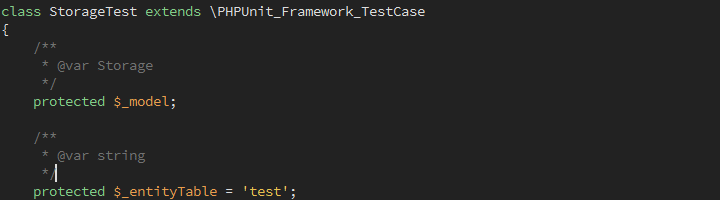
For easy an explanation I wrote an Observer for controller_action_predispatch

First write your events.xml in etc folder and create Observer at the Module Observer folder

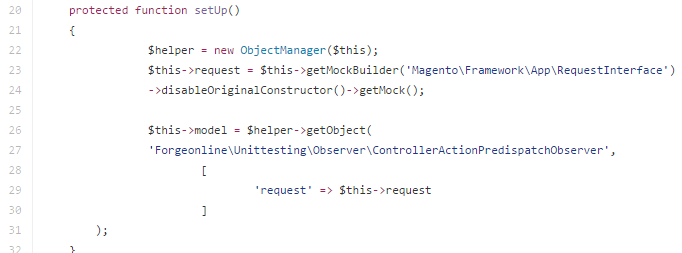
If you look at

public function setup()

Using

$this->getMockBuilder('Magento\Framework\App\RequestInterface')

you can create observer parameters to pass to the test observer

You can use Magento ObjectManager, if you need to create any objects in your Magento unit test file.

Likewise you can call any instances either using Object Manager, or directly using namespace.

Functions testGetTextTo and testMainSpace in this case it doesn’t have complex logic. But you can use as many test functions as you need.

Magento 2 unit test setup

Next let’s write our unit test.

The unit test goes inside the Test/Unit folder of your module. Since our example is an Observer you need to create the Observer folder inside of the Unit folder and include the Observer test file.

Test/Unit/Observer/ControllerActionPredispatchObserverTest.php

That’s It. Now you can run the Observer test file from Command line.

Open your command line tool and run the test file
/dev/tests/unit ../../../vendor/phpunit/phpunit/phpunit ../../../app/code/Forgeonline/Unittesting/Test/Unit/Observer/ControllerActionPredispatchObserverTest.php

You don’t need to install PHP Unit Test if you run the above code. Browse to your /dev/tests/unit folder and run phpunit test library.

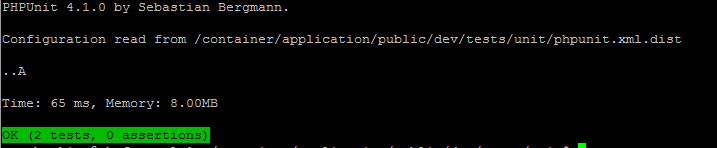
If the test was successful you will see the success message.

Magento 2 unit test success message

You can download the example from Github
More about Magento 2 Development Unit Testing
Find out more about PHP Unit Testing
Forge Magento Website development

Magento 2 Import and Export.

It’s Important to learn how to add Magento 2 import export functionality to your module in Magento 2.

All the classes you need to Import or Export your data can be found in
vendor/magento/module-import-export library.

The purpose of this article is to explain the functionality of the Magento 2 Import Export module. I’ll assume you know how to create the module for Magento already.

To simplify, Let’s assume your database is a list of Suburbs Data with the following Table structure.

  1. suburb_id
  2. suburb_name
  3. suburb_code
  4. suburb_state

Importing data.

To import data, you can extend the
Magento\ImportExport\Model\Import\Entity\AbstractEntity Class

First create import.xml file in your etc folder and include your import entity details

In your Forgeonline\Dataimportexport\Model\Import\Suburbs you need to create three abstract functions

public function _importData()
public function validateRow()
public function getEntityTypeCode()

In your validateRow() you can use $this->getBehavior($rowData) to validate against following

\Magento\ImportExport\Model\Import::BEHAVIOR_APPEND

Please refer the file at Github

Exporting data.

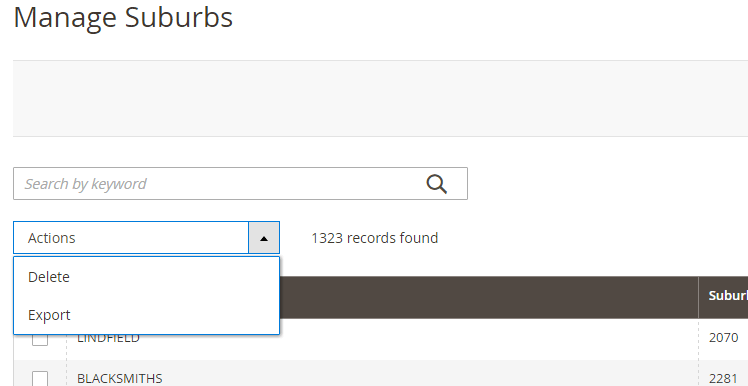
Since our database table is simple, we can export data in admin suburb gird layout list. we can include the massAction export function to the Suburbs admin grid Actions list.

Export Suburbs in Magento 2

Lets build the mass export action for our Suburbs:

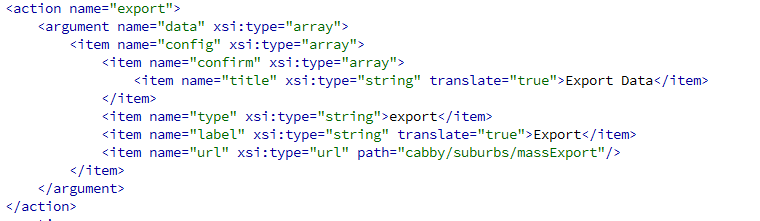
First you need to assign massExport action to in your admin view ui_component list.

I guess you’ve used the Magento UI Components library for you admin grid layouts.By using UI Component libraries not only can you build basic Magento functions much faster, but you will gain access to other cool functions like massActions, Filters etc.

Magento Mass Export Controller

Finally, you need to create your massExport.php action inside the controller.

In your massExport file you need to load massAction libraries

Magento\Ui\Component\MassAction\Filter
Magento\Ui\Model\Export\ConvertToCsv
Magento\Framework\Filesystem
Magento\Framework\App\Response\Http\FileFactory

In your public function execute() you can write your logic to create csv for download.

If you need more information, take a look at Magento\Ui\Component\MassAction\Filter class.

Please refer the example controller file in Github 

Forge Online Magento Website Development

Magento error logs and debugging.

Article explains how to use Magento and Apache error logs to debug or find issues in your installation.

It’s a good practice to check your error logs once a while. If you are still developing the site, turn on Magento developer mode
bin/magento deploy:mode:set developer

Magento error logs & reports

Depending on error type, Magento write it’s errors in several places. It’s important to know what these locations are, so you can easily debug the errors.

In Magento you need to turn on log write, so system start recording logs.

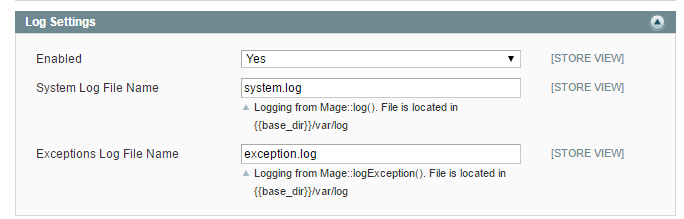
You need to go to Admin -> Configuration -> Advanced -> Developer -> Log setting

And Enable log settings. Keep the default files as it is.

Magento system log error log

Error Logs.

var/log folder contains the common log files along with error logs for your Magento 3rd party modules .

Magento system log file (system.log) and exception log files(exception.log) are saved to this folder unless you rename it from administrator configuration with different names.

Reading Error Files

To read your error logs, open it in your favorite editor.
Your error log file contains the following format

[error time] main.error_type error_description

Let’s look at few rows of system.log file

[2016-08-11 23:05:22] main.INFO: Add of item with id Magento_User::system_acl was processed [] []

[2016-08-11 23:50:27] main.INFO: Cache file with merged layout: LAYOUT_frontend_STORE1_40a98983867a1770682b48d9a0ad63441 and handles 1column: Please correct the XML data and try again. [] []

First line is a information log, set in Magento Backend module. This will indicate that Menu item is added to backend menu.

$this->_logger->info(
sprintf('Add of item with id %s was processed', $item->getId())
);

You need to focus on error type and error description. Error type indicates whether you need attention to a given error. Error description provides short description about a particular error.

Magento log system has several log levels;

  • EMERGENCY
  • CRITICAL
  • ALERT
  • ERROR
  • WARNING
  • NOTICE
  • INFO
  • DEBUG

It’s easy to follow the error time when debugging an issue. Check the time, a particular error happened and compare your logs for that particular time. Most of the errors can debug from your Magento log files.

Error Reports.

There has been an error processing your request
Exception printing is disabled by default for security reasons. By turning on developer mode you can view full details of the error.
Error log record number: 343443443351

We’ve all seen this error. All the critical exceptions will be written to var/report folder. You can find the error file by looking at the number. Error file for above example is 343443443351 and it doesn’t have any extension after it. You can open the file in you favorite editor.

Below is the first line of an error log file. Most often from the first line of the file you can find the error.

a:4:{i:0;s:86:"Class Forgeonline\Timeslotbooking\Model\Product\Attribute\BlockWeekdays does not exist";i:1;s:10460:"#0 /container/application/public/vendor/magento/framework/Code/Reader/ClassReader.php(19): ReflectionClass->__construct('Forgeonline\\Tim...')

Error describe of missing class file. This could be either missing class or Incorrect naming. To debug the error you need to double check the class file.

Apache Error Reports.

When it comes to errors and debugging them, we can not skip Apache error logs. You may need Apache error log access to debug some of the errors. Not all the errors are recorded to Magento logs.

Why Wordpress?

WordPress is flexible, powerful & fully featured.

In 2020 it’s the content management system of choice for over 37% of the world’s top million websites!

We build websites you can own

WordPress is an Open-Source Content Management System (CMS) that hundreds of thousands of web development companies large and small are using as a framework to build their websites on. It’s many native and add-on features come together to create a powerful tool that allows it to be used for a variety of needs including marketing, eCommerce, portfolios, or social networking. Overall, WordPress is the best web design choice for today’s company of any size.

WordPress Updates and Upgrades

As WordPress evolves and updates, you can get those updates applied to the site we built you too! There are literally thousands of highly skilled website development specialists working on WordPress and its plugin features, making it a feature-rich, high-performance system and a true world leader. Many local and smaller website systems use WordPress as their benchmark, sourcing ideas for their own web development programmes from features they see in WordPress.

Get a quote for a WordPress Website

Contact Form - Blog Posts
Subscribe to newsletter

Why use WordPress?

World’s most popular, globally supported content management system.

At Forge we believe you should own your website outright. This is why we build on the world’s most popular, globally supported and very easy to use open source website code for our web designs. The WordPress CMS also allows you to update and maintain your website from any location, anytime, without any prior programming knowledge. When planning your website, we select a CMS that matches your needs and goals, while still being fast, simple, and easy to use. Plus, because CMSs are web-based, so updates you make are applied instantly to your live website.

Don’t all WordPress website designs look the same?

In short: No. There are many thousands of layouts possible and an infinite number of colour, style and design combinations for your website design from Forge. You only get one chance to make a first impression, and your website design can influence how your company is perceived in the market. At Forge we understand the power of brands, we make sure your WordPress website design embodies the personality and image you want to portray, and leaves a lasting impression on your customers. The WordPress website designs we create are unique, customised and can be fully aligned with your overall design & marketing portfolio.

Who else uses WordPress?

WordPress is the single most popular website content management system in the world. As of August 2020 it is used by 27,021,750 live websites according to builtwith. It’s used by 37% of the world’s top one million websites, and is by far the most dominant open source CMS system available. Many companies worldwide are now using WordPress for their websites including Volkswagen, The New Yorker, BBC, Sony Playstation, Samsung, NY Times and many more. Don’t you think these brands would choose a powerful, effective, stable and highly supported CMS? They have. WordPress fits the bill perfectly. It’s also popular with many leading NZ businesses such as Escape Rentals, and Snowplanet.

Is WordPress Search Engine Friendly?

WordPress is extremely efficient for search engine optimisation (SEO) and with the addition of SEO plugins (which we include as standard) can become very powerful at gaining and keeping Google search engine ranking and compares favourably against many other systems on the market. Add SEO services to your WordPress website and you could have an advantage over your competitors right from the start. Forge will recommend additional SEO services for your site if relevant. WordPress also makes excellent use of social media compatibility.

Auckland, NZ based WordPress Developers

Local NZ developer.

Our team of WordPress developers are based in Kingsland, Auckland NZ. You can’t beat using a local NZ developer to build your website. Every day we meet with clients who are fed up with dealing with a developer who is based overseas. Aside from the frustrations of dealing with someone in another time zone who is not available when you want to talk it often ends up being more expensive than it first appears when you factor in all of your own time that is wasted from miscommunication due to language barriers and cultural differences in regard to the relative importance of aesthetics and functionality. We believe it is always better to work with a New Zealand based WordPress development company.

Data Futures

The Prospects and Pitfalls of Website Data Use in New Zealand.

Website data use is on an explosive trajectory globally, catalysed by the digitalisation of all sectors of life. This trend is no different in New Zealand, where data is being leveraged to achieve various outcomes, from enhanced business operations and personalized marketing to improved public service delivery.

However, this future of data-driven transformation does not come without concerns, ranging from privacy invasion to data discrimination. This article discusses the future of website data use in New Zealand, underscoring the potential improvements from big data and highlighting the attendant risks.

The Emergence of a Data-Driven Future.

New Zealand, like many nations globally, is witnessing an unprecedented increase in the volume, variety, and velocity of data. This surge is largely driven by digitization, which is enabling businesses, governments, and individuals to collect, store, and analyse vast amounts of information.

The rise of big data has the potential to catalyse a revolution across several sectors. For instance, in the business arena, big data can aid in predicting customer preferences, identifying market trends, and driving innovation. In the public sector, it can assist in formulating evidence-based policies, enhancing service delivery, and facilitating accountability.

Legislation in New Zealand has been responsive to these changing dynamics. The Privacy Act 2020 is an exemplary piece of legislation that addresses the use of personal information, especially in an era characterized by big data. This law outlines the principles that guide the collection, use, and disclosure of personal information, underscoring the need to respect individual privacy.

The Potential for Big Data.

The potential of big data to catalyse positive change is immense. For instance, it allows businesses to deliver personalized experiences to their customers by analysing their browsing habits, purchase history, and other online behaviours. This high level of customization can significantly enhance customer satisfaction and loyalty.

Moreover, big data can revolutionize the way government services are delivered. For example, analysing data from different government departments could identify overlapping services, enabling the development of integrated services that are more efficient and cost-effective. Additionally, big data can enable evidence-based policy making, helping the government make more informed and effective decisions.

Furthermore, the medical sector can immensely benefit from big data. Predictive analytics can be used to identify at-risk populations, optimize the allocation of resources, and improve patient outcomes. It can also facilitate medical research, leading to breakthroughs in treatments and therapies.

The Dark Side of Data.

However, the advent of big data comes with its challenges. A key concern is privacy. The collection and use of vast amounts of data, particularly personal data, raises the risk of privacy infringement. Although the Privacy Act 2020 provides some safeguards, such as requiring entities to inform individuals about the collection of their personal data and its intended use, the risk of unauthorized access or misuse of data remains.

Moreover, there is the risk of data discrimination, where algorithms that analyse big data can inadvertently reinforce societal biases. For example, if a loan approval algorithm is trained on data that includes biased decisions from human loan officers, it might perpetuate these biases by denying loans to individuals from certain demographic groups.

Finally, there is the potential for the misuse of data by governments. While big data can help to enhance service delivery and policy formulation, it can also be used for surveillance and control, undermining civil liberties.

The future of website data use in New Zealand.

New Zealand, like in many parts of the world, is promising, offering prospects of improved services, personalized experiences, and evidence-based decision-making. However, this future is also fraught with risks. Balancing the potential benefits of big data with the need to respect individual privacy, prevent data discrimination, and safeguard against the misuse of data by governments is crucial.

Therefore, moving forward, New Zealand must establish robust frameworks that both enable and regulate data use. This includes strengthening data protection regulations, such as the Privacy Act 2020, and establishing mechanisms to ensure compliance. Moreover, the use of algorithms should be transparent and subject to regular audits to prevent data discrimination.

In addition to this, public education and awareness are essential. Citizens should be informed about their rights and responsibilities when it comes to their personal data. They should be aware of how their data is used, and have the means to consent to, or deny, its use.

Furthermore, ethics should be a primary consideration in the use of big data. It’s essential to define clear ethical guidelines for data use, particularly in sectors like health, where the misuse of data can have severe consequences.

Finally, as the technology evolves, so too should the regulatory framework. Legislation should be flexible enough to adapt to the rapidly evolving landscape of data use, while still providing robust protections.

The future of website data use in New Zealand presents both enormous opportunities and serious challenges for web designers. The nation’s success in navigating this landscape will depend on its ability to leverage the advantages of big data, while also addressing the ethical, privacy, and discrimination concerns it raises. In doing so, New Zealand can become a global leader in the ethical, responsible use of data, setting a model for other nations to follow.

Let us help you leverage your website data.

Contact Form - Email Marketing. Effective or outdated?
Subscribe to newsletter

Thinking about how your branding aligns with your values?